Showing posts with label mods. Show all posts

Tuesday, October 26, 2010

Japanese Faction Mod


Hagekura is making making a japanese faction for Glest, it is intended for work with all variations of Glest (Vanilla Glest, GAE, Megaglest).

The mod is based on historical 16~17th century japan(there will be no-fantasy units). At the time Japan was under a civil war and the era was known for "SENGOKU JIDAI (era of warring states)".
Large variety of units will be included in this mod.such as ashigaru(conscripted spearman), archer, arquebuser, swordsman, armoured samurai, mounted samurai, cannon, warrior monks and ninjas Grin.along with many japanese traditional style buildings.

Currently it is done 70% of units and buildings.

More info: Glest forum

Saturday, May 15, 2010

New mod: Malevolent Rising (MRise)

What is Malevolent Rising (MRise)?


MRise is inspired by many games, but mainly: Doom (Doom models and animation will be included in this project), Stronghold Legends (I love werewolves lol), Rise of Legends, old games like Konung, Lords of Magic, Hexen and others.

Aiming for five detailed factions: Necribus (Werewolf and Satyr), Hyperion (Jotun [half-giants] and Angel), Gians (Dryad and Shapeshifter), The Damned (Scourge [half-ghosts] and Vampire) and Vestirus (Aquaparien [inspired by elder scrolls argonian] and Khajiit [as from elder scrolls too]).

So that's 2 races per faction. Each race (so twice per faction) will have their own Barracks for light troops and heavy troops, an element spire for magical troops and a draconic shrine for dragons (dragons will be worked on later once all factions are fully functional with standard units and magic units). I also intend to add some hero units in later, at least one per race (so two per faction).

The player will be able to play each faction in favour of one of the faction's races through upgrades and GAE subfactions.

More info: http://glest.org/glest_board/index.php?topic=5394.0;topicseen

New mod: Glest Total War

Author: njam2
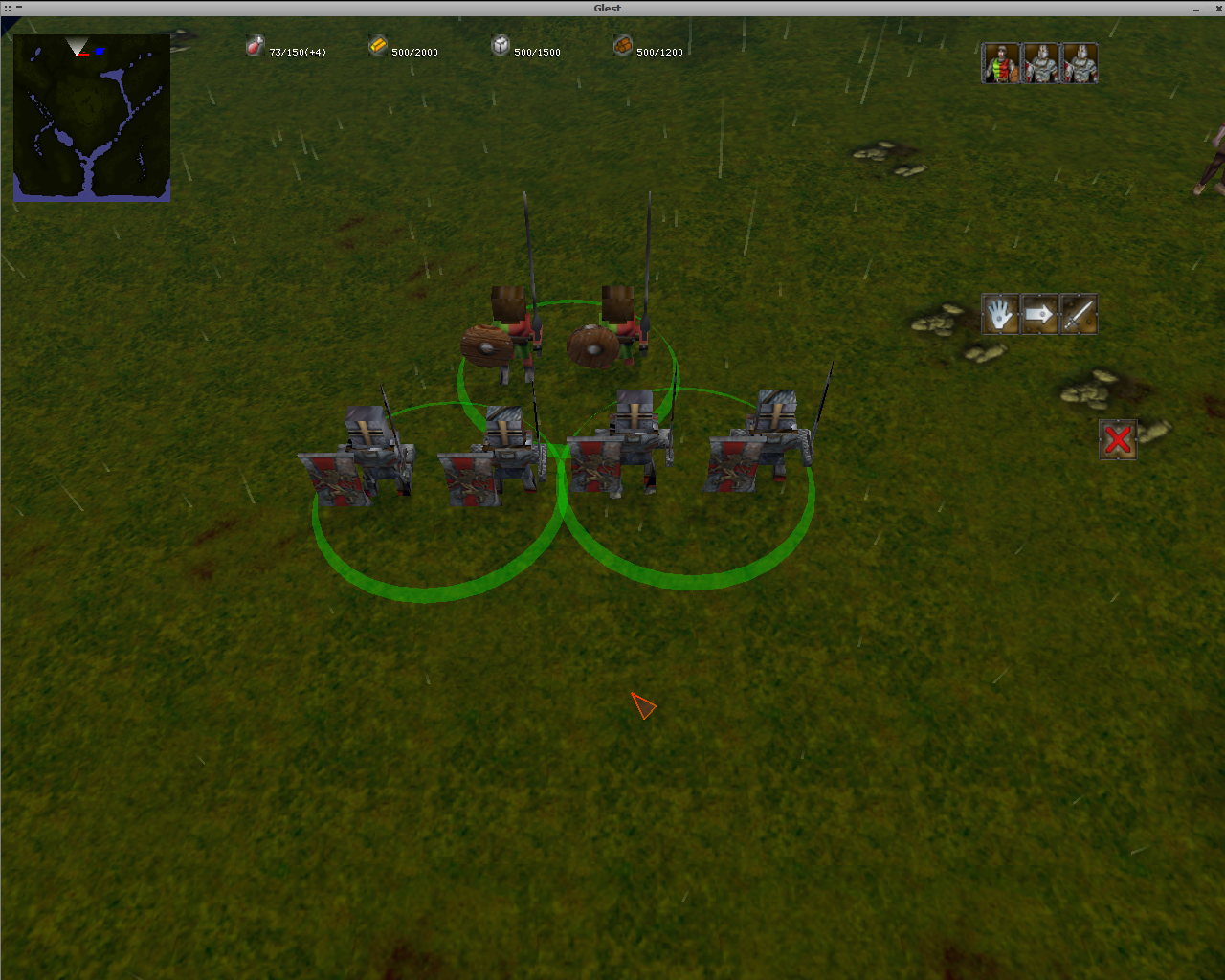
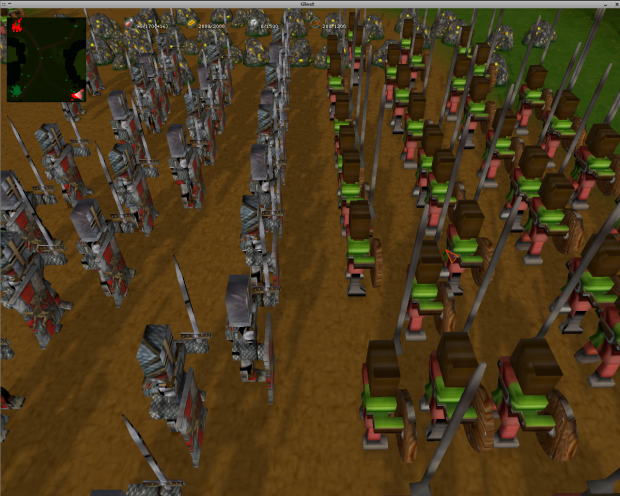
i am making a glest mod that makes it easy to make an army and fight with out building a bunch of stuff.

controlling more units: okay this was kine of hard but i did it! in Blender 3d i made each unit have two units like you control two at a time. so you have 10 units it would look like you have 20.

kines of units: i only have 2 kines of units, a Knight and a Spearman... knights are better but they cost more.

how to show you: i don't know how to take snapshots during the game if anyone could help me, then that would be good.

i don't know another kine of unit i could make.. i was thinking two handed sword men and they would be greater then knights but idk.  

More info: http://glest.org/glest_board/index.php?topic=5382.25


Sunday, May 9, 2010

Megaglest 3.3.4.3 released

Whats new in megaglest?

Version 3.3.4:
- Fog of war in scenarios is fixed

Version 3.3.4:
- Fixed multiplayer related crashes from 3.3.3
- 'M'-key to redisplay faded messages
- Some fontwork again
- Windows is using OpenAL as default
- Waterbug fixed. Walking in water volume is now releated to the camera position.

More info in forum: http://glest.org/glest_board/index.php?topic=5397.0

Sunday, April 11, 2010

Megaglest

Welcome to Megaglest!
Project homepage in general is:
https://sourceforge.net/projects/megaglest/

Here is the stable megaglest 3.3.3:
http://glest.org/glest_board/index.php?topic=5283.0

To see more screenshots click on the picture!


Whats new in megaglest?
Version 3.3.3:
- Font size adjustment can be set in the ingame options.
- Font colors can be toggled while playing using the 'C'-key.
- Bugfix for windows, ingame options can change resolutions now.
- Font Helvetica is used for linux and font Verdana is used for windows
- Fontsizes can be set very detailed in glest.ini
- Fixed glest.ini

Version 3.3.2:
- Changed windows version to use SDL and also added support for OpenAL sound
  (DirectSound is still the default)
- Sound issues for windows users are related to a bad dsound.dll in the
  mega-glest folder. Delete this file as it is not required since DirectX should
  already be installed on your Windows installation.

- Textures may now be in any of the following formats (tga, bmp, jpg and png)
- Scenarios, Techs and Factions all allow for a custom 'loading' page when
  starting a game. Mega-Glest will look for a file called: loading_screen.*
  where .* is any supported graphic file type (tga, bmp, jpg and png). The
  priority is first in the scenario folder (if loading a scenario) if not found
  it looks in the faction root folder and if not found it will look in the tech
  folder.
- Screen Resolutions can be changed in the ingame options menu now
- Added a LAN game auto-discovery feature. Clients may click the 'Find LAN Games'
  button to search on your local network for another Computer hosting a
  Mega-Glest game (a server).
- Mega-Glest now actually uses the ServerPort setting in the glest.ini
  (the default port for glest is 61357)
- Added a read-only display ofthe configured Server Port # when joining a network
  game.
- Added the ability to configure Fog of War per game session.
- Fully working Photo Mode where you may take good photos of your mega-glest
  game / mao scenario by setting the value in glest.ini:
  PhotoMode=true
- Added the ability to use a playername instead of the hostname when playing
  in a network game. Goto the options area (Options button on main screen)
  and type your custom playername into the Network Player Name edit box.
- Added the ability to rotate units when creating a unit (before placing it)
  by pressing the R key (for rotate)
- Added camera zoom in/ out (like in GAE) by using the scroll wheel on your
  scroll mouse
- Added MANY new configurable items in glest.ini (some are optional and may not
  be in the ini file. Most options are described when you run the configurator
  application.
- Added the ability to run Glest full screen on multiple monitors
  (currently linux only) via the two settings in glest.ini:
  AutoMaxFullScreen=true
  Windowed=false
- Users may now save all user created context in their own customer folder using
  the glest.ini setting:
  UserData_Root=mydata/
  where mydata is a folder under the current glest folder. You may use ANY path
  in this setting.
- Glest allows users to specify a special folder to read / write the ini and log
  files. To do this set an environment variable with the name:
  GLESTHOME=/mycustomerpathtoawritablefolder/
- When experiencing problems, users may enable debugging to a logfile using the
  following glest.ini settings:
  DebugLogFile=debug.log
  DebugMode=true
  DebugNetwork=true
  This will log all debug information to a file in the glest folder called
  debug.log
- fixed a bug with not calling in lua scenario, when died due
  to running out of consumable ressources like food
- fixed the bug which lets you loose the active command if one of your unit dies.
  This was the problem that made it very hard to build buildings when you are in
  a battle for example.
- When a AI is disable for a faction in a scenario this faction doesn't consume
  consumable ressources like food any more.

Version 3.3.1:
- fixed a bug with network consistency checks ( it wasn't completly active any more in 3.3.0 )
- network consistency checks are reported more user friendly (on server and client )
- all network related errors should be handled with a dialog and doesn't crash glest any more.

Version 3.3.0:
- New multiplayer version of megaglest! It should be much more stable now
  and less choppy than original glest !
- New disconnect messages and chat in connect menu .....
- Now with several particles for every skill!
- black particles!
- Fire with smoke for every "burnable" unit ( even walking/flying ones )
- 8 player support
- Individual particle systems for damage indication
- More particles everywhere in the data
- New snow
- Ingame option to switch off all the new particles ( for slow machines )
- Morphing ground units to flying units
- Damage-all switch in splash definition works now
- Linux editor/g3dviewer/configurator are working and part of the linux
  distribution too now
- New maps
- New tileset scrubland
- Editor with lots of comfort functions and 8 player (*.mgm) support.
  The editor includes things like undo/redo, brush copy , mouseover display now

since Version 3.2.3:
- Only needed factions are loaded ( thanks silnarm ).
- a weeker CPU player was added for real beginners
- two new CPU players were added ( CPU-Mega and CPU-Easy )
- much much more data compared to glest ( factions/maps/tilesets ...)

megaglest ( 3.3.2 released! )

Come and get it while its hot, version 3.3.2 is released!
( For more info about megaglest click here )

Windows x86 Full installer:
download here ( update: install the windows binaries below too, because they include a patch which is not in the installer yet! )

Windows x86 binaries:
download here
Linux x86 binaries:
download here

Full Data package (for both linux and windows, intended for new installs [not using the win32 installer]):
download here
Data Package UPDATES ONLY (since the last major release of 3.3.0):
download here

Source Package:
download here
=================

Here are the release notes:

Version 3.3.2:
- Changed windows version to use SDL and also added support for OpenAL sound
  (DirectSound is still the default)
- Sound issues for windows users are related to a bad dsound.dll in the
  mega-glest folder. Delete this file as it is not required since DirectX should
  already be installed on your Windows installation.
- Textures may now be in any of the following formats (tga, bmp, jpg and png)
- Scenarios, Techs and Factions all allow for a custom 'loading' page when
  starting a game. Mega-Glest will look for a file called: loading_screen.*
  where .* is any supported graphic file type (tga, bmp, jpg and png). The
  priority is first in the scenario folder (if loading a scenario) if not found
  it looks in the faction root folder and if not found it will look in the tech
  folder.
- Screen Resolutions can be changed in the ingame options menu now
- Added a LAN game auto-discovery feature. Clients may click the 'Find LAN Games'
  button to search on your local network for another Computer hosting a
  Mega-Glest game (a server).
- Mega-Glest now actually uses the ServerPort setting in the glest.ini
  (the default port for glest is 61357)
- Added a read-only display ofthe configured Server Port # when joining a network
  game.
- Added the ability to configure Fog of War per game session.
- Fully working Photo Mode where you may take good photos of your mega-glest
  game / mao scenario by setting the value in glest.ini:
  PhotoMode=true
- Added the ability to use a playername instead of the hostname when playing
  in a network game. Goto the options area (Options button on main screen)
  and type your custom playername into the Network Player Name edit box.
- Added the ability to rotate units when creating a unit (before placing it)
  by pressing the R key (for rotate)
- Added camera zoom in/ out (like in GAE) by using the scroll wheel on your
  scroll mouse
- Added MANY new configurable items in glest.ini (some are optional and may not
  be in the ini file. Most options are described when you run the configurator
  application.
- Added the ability to run Glest full screen on multiple monitors
  (currently linux only) via the two settings in glest.ini:
  AutoMaxFullScreen=true
  Windowed=false
- Users may now save all user created context in their own customer folder using
  the glest.ini setting:
  UserData_Root=mydata/
  where mydata is a folder under the current glest folder. You may use ANY path
  in this setting.
- Glest allows users to specify a special folder to read / write the ini and log
  files. To do this set an environment variable with the name:
  GLESTHOME=/mycustomerpathtoawritablefolder/
- When experiencing problems, users may enable debugging to a logfile using the
  following glest.ini settings:
  DebugLogFile=debug.log
  DebugMode=true
  DebugNetwork=true
  This will log all debug information to a file in the glest folder called
  debug.log
- fixed a bug with not calling in lua scenario, when died due
  to running out of consumable ressources like food
- fixed the bug which lets you loose the active command if one of your unit dies.
  This was the problem that made it very hard to build buildings when you are in
  a battle for example.
- When a AI is disable for a faction in a scenario this faction doesn't consume
  consumable ressources like food any more.
xx